This article demonstrates how to create A Simple Counter Application in React.

This code consists of two React components: CounterApp.js and App.js, demonstrating the implementation of a simple counter application. Let’s break down each part:
CounterApp.js
import React, { useState } from 'react';
const CounterApp = () => {
  const [count, setCount] = useState(0);
  return (
    <div>
      <h1>Counter App</h1>
      <p>Count: {count}</p>
      <button onClick={() => setCount(count + 1)}>Increment</button>
      <button onClick={() => setCount(count - 1)}>Decrement</button>
      <button onClick={() => setCount(0)}>Reset</button>
    </div>
  );
};

export default CounterApp;
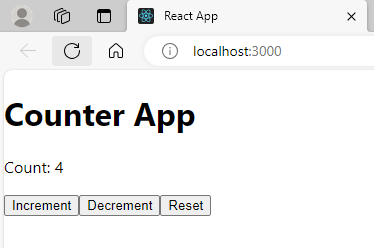
In the CounterApp component, a functional component is defined. It uses the useState hook to manage the state of the count variable, initialized with a default value of 0. The component renders a heading, a paragraph displaying the current count, and three buttons for incrementing, decrementing, and resetting the count. The setCount function is used to update the count state based on user interactions.
App.js
// App.js

import React, { useState } from 'react';
import CounterApp from './CounterApp';

function App() {
  return (
    <div className="App">
      <CounterApp />
     </div>
  );
}

export default App;
In the App component, the CounterApp component is imported and rendered within the main application. This structure demonstrates the composition of smaller, reusable components within a larger React application. By including the CounterApp component, users can interact with the counter functionality directly within the main application, showcasing the flexibility and modularity of React components.
In summary, this code showcases a basic counter application where the CounterApp component manages and displays a count, allowing users to increment, decrement, or reset the count. The App component serves as the entry point, incorporating the counter functionality into the overall React application structure.
Output
Further Reading
How to Create Class Components in React?
Examples of Array Functions in PHP
Exploring PHP Arrays: Tips and Tricks
Registration Form Using PDO in PHP
Inserting Information from Multiple CheckBox Selection in a Database Table in PHP
PHP Projects for Undergraduate Students
Architectural Constraints of REST API
Creating a Classified Ads Application in PHP
How to Create a Bar Chart in ReactJS?
- Angular
- ASP.NET
- C
- C#
- C++
- CSS
- Dot Net Framework
- HTML
- IoT
- Java
- JavaScript
- Kotlin
- PHP
- Power Bi
- Python
- Scratch 3.0
- TypeScript
- VB.NET