
📌 Introduction
Temperature conversion is a common programming exercise.
In this program, we will:
- take temperature in Celsius
- convert it into Fahrenheit
- display the result on the same page
The conversion formula is:
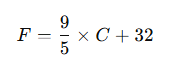
This program is useful for understanding:
- Django forms
- POST method
- arithmetic logic in views
🎯 Program Statement
👉 Create a temperature converter form (Celsius to Fahrenheit).
🧠 Concept
This program uses:
forms.pyfor input fieldviews.pyfor conversion formulatemplatefor displaying form and result
⚙️ Step 1: Create Form
📁 File: forms.py
🔹 Path:
myproject/myapp/forms.py
🔹 Code:
from django import forms

class TemperatureForm(forms.Form):
    celsius = forms.FloatField(label='Enter Temperature in Celsius')
🧠 Explanation
- We created one field named
celsius FloatFieldis used so the program can accept decimal temperatures also
⚙️ Step 2: Create View
📁 File: views.py
🔹 Path:
myproject/myapp/views.py
🔹 Code:
from django.shortcuts import render
from .forms import TemperatureForm

def temperature_converter(request):
    fahrenheit = None
    celsius_value = None

    if request.method == 'POST':
        form = TemperatureForm(request.POST)
        if form.is_valid():
            celsius_value = form.cleaned_data['celsius']
            fahrenheit = (9 / 5) * celsius_value + 32
    else:
        form = TemperatureForm()

    return render(request, 'temperature.html', {
        'form': form,
        'celsius': celsius_value,
        'fahrenheit': fahrenheit
    })
🧠 Explanation
- Input is collected from form
- Formula is applied in the view
- Both Celsius and Fahrenheit values are passed to the template
⚙️ Step 3: URL Mapping
📁 File: urls.py
🔹 Path:
myproject/myproject/urls.py
🔹 Code:
from django.contrib import admin
from django.urls import path
from myapp import views

urlpatterns = [
    path('admin/', admin.site.urls),
    path('temperature/', views.temperature_converter, name='temperature_converter'),
]
⚙️ Step 4: Create Template
📁 File: temperature.html
🔹 Path:
myproject/templates/temperature.html
🔹 Code:
<!DOCTYPE html>
<html>
<head>
    <title>Temperature Converter</title>
</head>
<body>

    <h1>Celsius to Fahrenheit Converter</h1>

    <form method="post">
        {% csrf_token %}
        {{ form.as_p }}
        <button type="submit">Convert</button>
    </form>

    <hr>

    {% if fahrenheit is not None %}
        <h2>Celsius: {{ celsius }}</h2>
        <h2>Fahrenheit: {{ fahrenheit|floatformat:2 }}</h2>
    {% endif %}

</body>
</html>
🧠 Explanation
- Form is displayed using
{{ form.as_p }} - The result is shown only after submission
floatformat:2shows the Fahrenheit value up to 2 decimal places
⚙️ Step 5: Run Server
python manage.py runserver
🌐 Step 6: Output
Open:
👉 http://127.0.0.1:8000/temperature/
✅ Example Input:
- Celsius = 37
✅ Output:
Celsius: 37
Fahrenheit: 98.60
🧠 How It Works
- User opens the temperature form page
- Enters Celsius value
- Form is submitted using POST
- Django validates the value
- View applies conversion formula
- Template displays the result
🔥 Key Concepts
Django Form
class TemperatureForm(forms.Form):
Defines the input structure.
FloatField
celsius = forms.FloatField(...)
Allows decimal values.
Conversion Formula
fahrenheit = (9 / 5) * celsius_value + 32
Converts Celsius to Fahrenheit.
Conditional Display
{% if fahrenheit is not None %}
Shows output only after form submission.
⚠️ Common Errors
❌ Forgot {% csrf_token %}
POST form will fail due to CSRF verification error.
❌ Wrong formula
Use:
(9 / 5) * celsius + 32
and not 9 / (5 * celsius) + 32.
❌ Using CharField instead of FloatField
Temperature should be numeric, so FloatField is appropriate.
❌ Output not showing for 0°C
Use:
{% if fahrenheit is not None %}
instead of {% if fahrenheit %} because 0 can cause problems in some checks.
❌ Import error in views.py
Import form correctly:
from .forms import TemperatureForm
🧪 Practice Questions
- Convert Fahrenheit to Celsius
- Create a two-way converter
- Add Kelvin conversion
- Display a message like “Boiling point of water” when Celsius = 100
🎤 Viva Questions & Answers
1. Why is FloatField used in this program?
FloatField is used because temperature values can be decimals such as 36.5 or 98.6.
2. Why is POST method used here?
POST method is used because the user submits input data to the server for processing. It is safer than GET for forms.
3. What is the role of forms.py?
forms.py defines the form fields and their types. It makes input handling cleaner and more structured.
4. What does is_valid() do in this program?
It checks whether the submitted Celsius value is valid before applying the conversion formula.
5. Why is the conversion logic written in the view?
The view handles program logic and calculations, while the template only displays output. This keeps code organized.
6. What is floatformat:2 in the template?
It is a Django template filter used to display the Fahrenheit result up to 2 decimal places.
7. Can this program accept negative temperatures?
Yes, FloatField allows negative values, so temperatures below 0°C can also be converted.
8. Why do we use {% csrf_token %} in the form?
It is required for security in Django POST forms and protects against CSRF attacks.
👉 Next Post: Create a Django Form to Determine Whether a Number is Even or Odd
👉 Back to List: Django Programs (60 Questions with Solutions)
Further Reading
Introduction to Django Framework and its Features
Examples of Array Functions in PHP
Registration Form Using PDO in PHP
Inserting Information from Multiple CheckBox Selection in a Database Table in PHP
- Angular
- ASP.NET
- C
- C#
- C++
- CSS
- Dot Net Framework
- HTML
- IoT
- Java
- JavaScript
- Kotlin
- PHP
- Power Bi
- Python
- Scratch 3.0
- TypeScript
- VB.NET