
📌 Introduction
BMI (Body Mass Index) is used to check whether a person is:
- Underweight
- Normal
- Overweight
- Obese
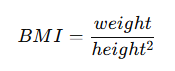
(Weight in kg, Height in meters)
🎯 Program Statement
👉 Create a BMI calculator using a POST form.
🧠 Concept
This program includes:
- Input: Weight & Height
- Processing: BMI calculation
- Output: BMI value + category
⚙️ Step 1: Create Form
📁 File: forms.py
🔹 Path:
myproject/myapp/forms.py
🔹 Code:
from django import forms

class BMIForm(forms.Form):
    weight = forms.FloatField(label='Enter Weight (kg)')
    height = forms.FloatField(label='Enter Height (meters)')
⚙️ Step 2: Create View
📁 File: views.py
🔹 Path:
myproject/myapp/views.py
🔹 Code:
from django.shortcuts import render
from .forms import BMIForm

def bmi_calculator(request):
    bmi = None
    category = None

    if request.method == 'POST':
        form = BMIForm(request.POST)
        if form.is_valid():
            weight = form.cleaned_data['weight']
            height = form.cleaned_data['height']

            bmi = weight / (height ** 2)

            # Category logic
            if bmi < 18.5:
                category = "Underweight"
            elif bmi < 25:
                category = "Normal"
            elif bmi < 30:
                category = "Overweight"
            else:
                category = "Obese"
    else:
        form = BMIForm()

    return render(request, 'bmi.html', {
        'form': form,
        'bmi': bmi,
        'category': category
    })
⚙️ Step 3: URL Mapping
📁 File: urls.py
🔹 Path:
myproject/myproject/urls.py
🔹 Code:
from django.contrib import admin
from django.urls import path
from myapp import views

urlpatterns = [
    path('admin/', admin.site.urls),
    path('bmi/', views.bmi_calculator, name='bmi'),
]
⚙️ Step 4: Create Template
📁 File: bmi.html
🔹 Path:
myproject/templates/bmi.html
🔹 Code:
<!DOCTYPE html>
<html>
<head>
    <title>BMI Calculator</title>
</head>
<body>

    <h1>BMI Calculator</h1>

    <form method="post">
        {% csrf_token %}
        {{ form.as_p }}
        <button type="submit">Calculate BMI</button>
    </form>

    <hr>

    {% if bmi %}
        <h2>Your BMI: {{ bmi|floatformat:2 }}</h2>
        <h3>Category: {{ category }}</h3>
    {% endif %}

</body>
</html>
⚙️ Step 5: Run Server
python manage.py runserver
🌐 Step 6: Output
✅ Example Input:
- Weight: 70 kg
- Height: 1.75 m
✅ Output:
Your BMI: 22.86
Category: Normal
🧠 How It Works
- User enters weight & height
- Data submitted via POST
- Django validates form
- BMI calculated in view
- Category determined
- Result displayed in template
🔥 Key Concepts
FloatField
forms.FloatField()
Used for decimal input
Conditional Logic
if bmi < 18.5:
Used to classify BMI
Template Filter
{{ bmi|floatformat:2 }}
Rounds value to 2 decimal places
⚠️ Common Errors
❌ Division by zero
👉 If height = 0 → error
👉 Improve:
if height > 0:
❌ Forgot CSRF token
👉 Form will not submit
❌ Wrong unit
👉 Ensure:
- Weight in kg
- Height in meters
❌ Result not showing
👉 Use:
{% if bmi %}
🧪 Practice Questions
- Add validation for height > 0
- Display BMI category in color
- Add input placeholders
- Convert cm to meters automatically
🎤 Viva Questions & Answers
1. Why use FloatField in this program?
Because weight and height may contain decimal values.
2. What is floatformat filter?
It is used to format decimal numbers to a fixed number of decimal places.
3. What happens if height is zero?
Division by zero error will occur, so validation should be added.
4. Why is BMI calculated in view and not template?
Because templates should not contain business logic; calculations belong to views.
5. What is form validation?
It ensures that input data is correct and safe before processing.
👉 Next Post: Marks Form (Total & Average)
👉 Back to List: Django Programs (60 Questions with Solutions)
Further Reading
Introduction to Django Framework and its Features
Examples of Array Functions in PHP
Registration Form Using PDO in PHP
Inserting Information from Multiple CheckBox Selection in a Database Table in PHP
- Angular
- ASP.NET
- C
- C#
- C++
- CSS
- Dot Net Framework
- HTML
- IoT
- Java
- JavaScript
- Kotlin
- PHP
- Power Bi
- Python
- Scratch 3.0
- TypeScript
- VB.NET